
Best gaming PC under 50000 rupees
Pros:
4GB nVidia GeForce 1050TI
i5 8300H Upto 4GHz
Separate SSD + 1TB HDD
Backlit Keyboard
Crisp Display
Easy HDD and RAM Access
Decent Audio, Loud but Bass is bit less
Cons:
Runs Hot (Like “you can make omelette on it” hot)
Previous Gen Thunderbolt Port
Acer Warranty Only 1 Year
What is Node.js
It is a JavaScript runtime built on google Chrome’s V8 JavaScript Engine.
Basically it makes Javascript a server side language, Without Node Javascript is a client (Browser) side language only.
What can you do with it?
Backend Apps, Chat, CMS and a many more
What is NPM?
Its Node Package Manager
Used for installing Node Programs and Modules






Hi Folks,
I’m gonna show you how to make a DIY Racing Wheel.
Lets begin.
1. Grab your android phone. Go to play store and install Monect.
2. Install the monect PC program on your PC. (you need a bluetooth or wifi enabled PC, Internet Modem with Wifi hooked to your PC with a LAN chord will work too.)
3. Keep your keyboard on the floor.
5. Start your favorite Video Game and set the controls as following:
6. Bingo!! Have fun. Thank me later 😉
You’d get all the details required to setup monect here .
Don’t forget to leave your comments below!!!
Disclaimer: I won’t be responsible if you spoil your grades due to excessive gaming.
LAVA XOLO Q800 REVIEW
I bought this phone for its performance and its camera and I didn’t expect such an awesome phone from Xolo. Xolo is totally into making high performing mid range phones with its latest q series. It is the result of continuous effort that company is able to make such handsets. It is available online at a price of Rs 11500 but can be bought for less than 10,000 from mobile selling shops. It has some good features like shake function, Set screen on, Sleep timer for music player and turn over to mute and is a dual sim phone.
Inside the package:
It comes with a preplaced scratch guard on the screen and an extra scratch guard inside the box, a data cable, phone manual, warranty manual, usb charger and a hearphone. The phone loudspeaker is average but the head phone come with extra bass and produce a decent sound. The phone comes in two colours: white and black. I bought the black one as it looks good but if you want it in 1k or 2k less price than buy the white one.
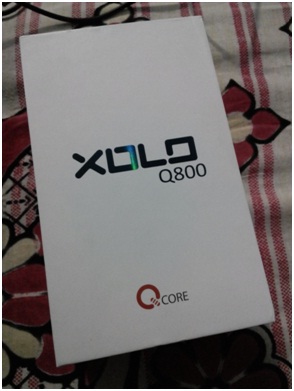
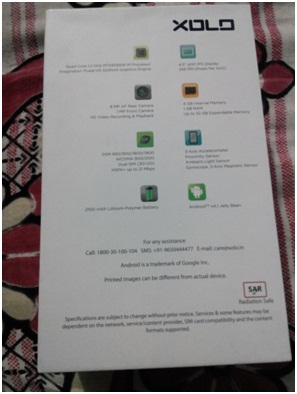
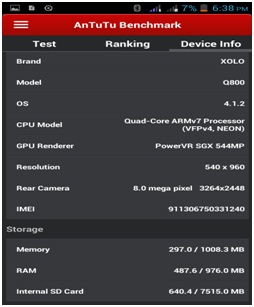
Specfications: Value For Money
Phone name: Xolo q800
Chipset: MTK MT6589 OR MTK MT6589 (in new phones)
Gpu: Power SGX 544mp
Ram: 1 GB
CPU: 1.2Ghz Quad core Cortex A7
Display: IPS Lcd 16 million colours
Size & Resolution: 4.5”inch, qhd display (540*960), 245ppi, (540*960)
Android OS: 4.1.2 JB (default), 4.2.2 OTA update available
Battery: 2100mAh
Memory: 4 GB (available1737.3MB) internal, Expandable up to 32 GB
Connectivity: Bluetooth 4.0, 3G(HSPA+) Downlink- 21mbps, Uplink-5.76mbps, Micro USBv2.0, Wi-Fi 802.11b/g/n, Wi-Fi direct, Wi-Fi Hotspot and GPS
Colours: White, Black
Sensors: Accelerometer, Proximity, Ambient, Light sensor, Gyroscope, Compass
Camera: 8MP BSI sensor, Automatic Focus, Led Flash, Stills-3264*2448pixels Video Recording- 720p@ 30fps, 3gp format, Front camera: 1MP, Stills-1280*720 pixels
Dual Sim: Yes
Weight: 143.5 gm
The Specifications are good for this kind of price. The phone doesn’t lag and is good for any person looking for a mid range gaming phone.
Pros in specifications: Good display, no lags and Value for Money
Cons in specifications: No Usb On the go support and plastic body
Display: Very Good
Xolo has provided an ips lcd screen with 245ppi and the display is very good and the screen is visible with 50% brightness under sunlight. I recommend you to buy a cover for this phone as the screen is made up of glass and it might break if it slips from hand.
Battery life and Connectivity:
The phone comes with a 2100 mAh Li-Ion Battery which is pretty average but you can download xolo care app from play store which really saves the battery.
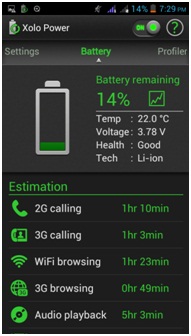
The phone comes with 3g, wi-fi, bluetooth and other options but the device would have been more good it had other things like Otg(USB-On-The-Go) ,HDMI or NFC.
Phone Design and UI: Good
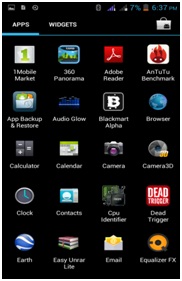

The q800 doesn’t look like a 32k phone but it has a good look and a better build quality than other phones in its category. The back panel is made of plastic which can break if not handled properly. The back panel provides a good grip but design is not what for you should buy this phone for.
User Interface: Android 4.1.2 jelly bean(default) but can be updated to jelly bean 4.2.2
The UI maintains stock android and the company has not made many changes to the UI. The phone comes with a file browser, xolo care, xolo power and the essential apps. The contacts page has been modified a little but it doesn’t make a big difference. It has a xolo care app which looks after the after sales service of xolo brand.
Camera: Average
The xolo q800 is equipped with a 8mp hd camera. It includes a bsi sensor to assist low light conditions photos. The bsi sensor doesn’t work well as the images i took had a lot of noise and were average in detailing. It comes with other feature such hdr mode, macro, indoor,portrait, night mode. It also includes burst mode which can capture 40 or 99 images at a go. It also lets you adjust iso and other settings. It can shoot 720p videos which are good as compared to other phones in the same category. The outdoor images are good but night images are average. It also comes with other effects such as sepia sketch etc
Aperture: f/2.2
Shutter speed:1/5s
Focal length:3.7mm
Camera Samples
Outdoor:
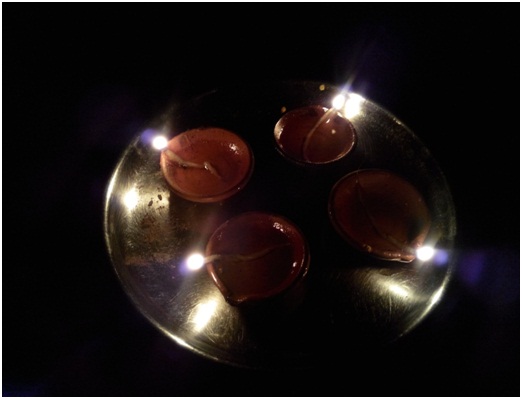
Low Light Photos and Indoor photos:

Performance: Best in its range
This is the main reason for which is bought this phone. It doesn’t lag and has a smooth interface. Web browsing is really fast with opera mini or other fast browsers. I installed some heavy graphic and processor demanding games and they ran very smoothly. Heavy games like dead trigger, iron man3, nfs most wanted and vice city run smoothly at high graphic settings. It passed the multitasking test with ease.
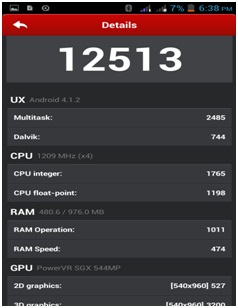
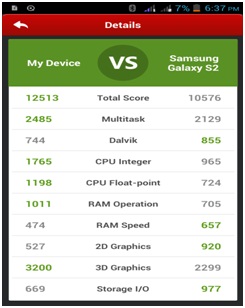
I compared my device with Samsung galaxy s2 and it was ahead of it in most aspects and antutu benchmark score was 12513.
The phone loudspeaker is average but the headphones that come in the package produce a decent sound.
The phone takes around 25 seconds to start and 6 sec to shut down and 720p videos work well on mx player but 1080p videos only work in s/w mode.
Conclusion: A phone that delights you
The xolo q800 is best in performance, better in camera than other phones in its price range and really a good phone from Xolo, moreover I recommend you to buy this phone if you need a mid range gaming phone.
Sometimes we need to add sub sub categories in opencart header with the product images. One of my client wanted a similar layout, I did it with the following code.
Add the following code to header controller.
$categories_1 = $this->model_catalog_category->getCategories(0);

foreach ($categories_1 as $category_1) {
$level_2_data = array();

$categories_2 = $this->model_catalog_category->getCategories($category_1['category_id']);

foreach ($categories_2 as $category_2) {

/*Incase level 3 not available*/

$level_5_data = array();

$categories_5 = $this->model_catalog_product->getProducts($data = array('filter_category_id' => $category_2['category_id']));

foreach ($categories_5 as $category_5 ) {

$level_5_data [] = array(
'name' => $category_5['name'],
'image' => $server . 'image/' . $category_5['image'],
'href' => $this->url->link('product/product', 'product_id=' . $category_5['product_id']),
);

}
/*Incase level 3 not available*/
$level_3_data = array();

$categories_3 = $this->model_catalog_category->getCategories($category_2['category_id']);

foreach ($categories_3 as $category_3) {
// Custum code for for products by Diwakar Mishra (Appealsoft)
$level_4_data = array();

$categories_4 = $this->model_catalog_product->getProducts($data = array('filter_category_id' => $category_3['category_id']));

foreach ($categories_4 as $category_4 ) {

$level_4_data [] = array(
'name' => $category_4['name'],
'image' => $server . 'image/' . $category_4['image'],
'href' => $this->url->link('product/product', 'product_id=' . $category_4['product_id']),
);
}
// Custum code for for products by Diwakar Mishra (Appealsoft)
$level_3_data[] = array(
'name' => $category_3['name'],
'children' => $level_4_data,
'column' => $category_3['column'] ? $category_3['column'] : 1,
'href' => $this->url->link('product/category', 'path=' . $category_1['category_id'] . '_' . $category_2['category_id'] . '_' . $category_3['category_id'])
);
}

$level_2_data[] = array(
'name' => $category_2['name'],
'children' => $level_3_data,
'children_else' => $level_5_data,
'href' => $this->url->link('product/category', 'path=' . $category_1['category_id'] . '_' . $category_2['category_id'])
);
}

$this->data['categories'][] = array(
'name' => $category_1['name'],
'children' => $level_2_data,
'column' => $category_1['column'] ? $category_1['column'] : 1,
'href' => $this->url->link('product/category', 'path=' . $category_1['category_id'])
);
}
you will need to change the header.tpl file and create a loop of the above arrays to get the final result.
If you’re a true PC gamer, you know how cool and proud it is to be one. We all do all kinds of things with our Rigs… You know.. keeping check on hardware temperatures to make sure everything is going well, or checking frames per second to adjust the optimum settings, or overclocking to squeeze out the best from the gpu/cpu or just recording a gameplay too show off on your YouTube account. Here’s are The 5 best tools for PC Gamers.
1. Monitoring Hardware temperatures : Real Temp
There are many good tools available out there to monitor hardware temperature, I find real temp the best as its lite, simple, accurate and has an alarm feature which triggers the alarm if the temperatures crosses a certain limit set by the user.
2. Gameplay recording : Fraps
Nothing can beat Fraps when it comes to recording your game-play, It just the best tool you can get. It also offers few amazing features like Showing frames per second during game-play and a built in bench-marking tool as well. It offers one key press Sart/Stop Recording. There is a small problem tough, the recordings it does are huge in size, but compared to the features it offers it can be overlooked.
3. Overclocking GPU : MSI Afterburner
No matter what brand/Make GPU you own, it supports everything and has got all the razzle-dazzle, Overcloking your GPU is just easy with MSI Afterburner.
4. Virtual Optical Drive : Wincdemu
This is just what you need, install it and forget.Its even less than 1 MB in size. Next time when you’ll double click on any of your Dic Image Files on your hard drive wincdemu will automatically detect and create a Virtual Drive For you.
5. CPUZ : CPUZ
It is a light program which gathers information about your PC’s main components like CPU and Ram. when it comes to checking CPU information this is the most popular one.
Hope this would help you Game better, Stay connected for more.
Happy Gaming.